Get in touch
Why the Future of AI Is Not Better Prompts, but Agents, Loops, Graphs, and Harnesses.
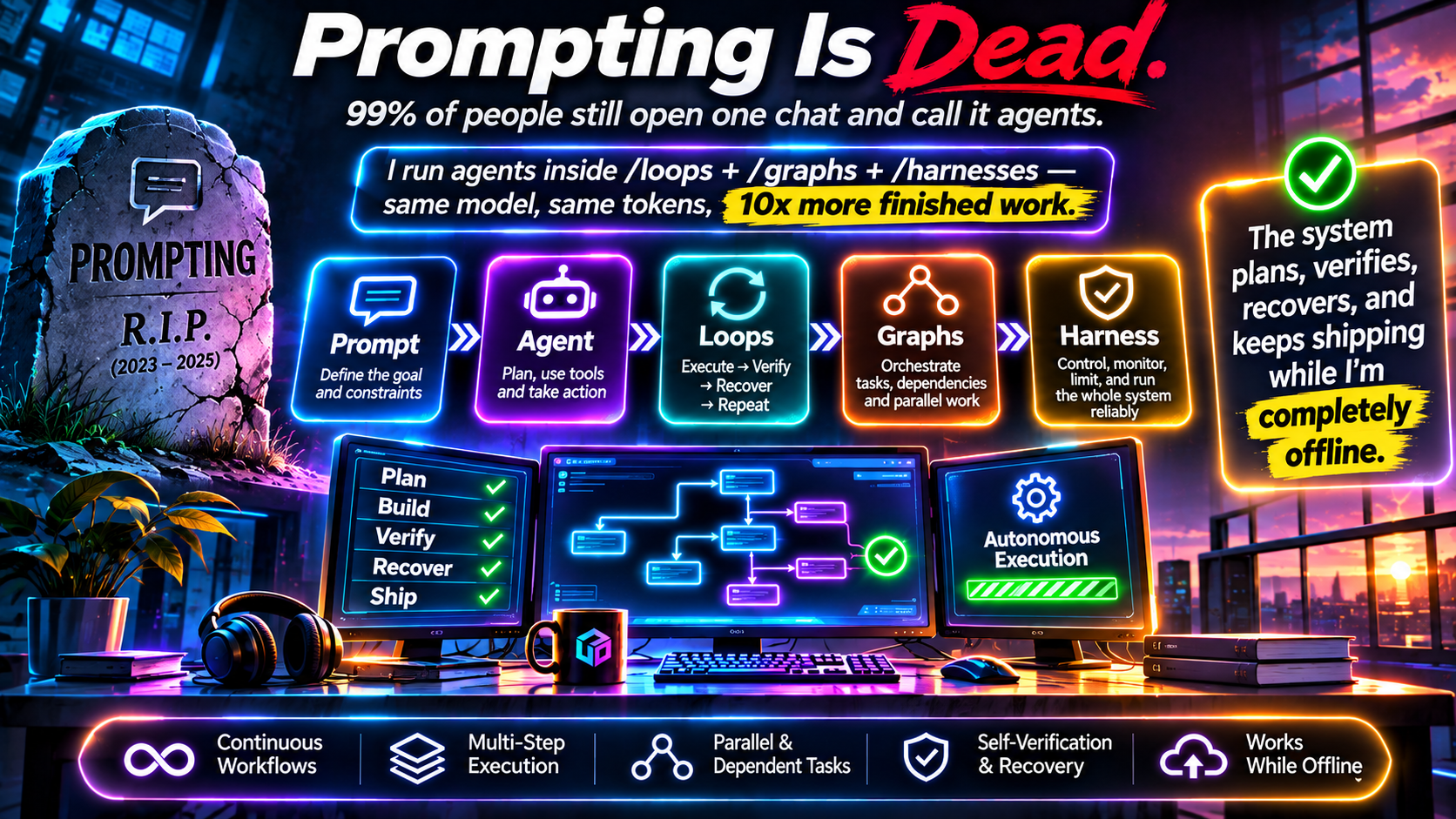
Prompting Is Dead: Why the Future of AI Is Not Better Prompts, but Agents, Loops, Graphs, and Harnesses
The biggest misunderstanding in modern AI
For the past few years, the AI conversation has revolved around one central idea: prompting.
People have spent countless hours learning how to write better instructions, discover hidden prompt techniques, construct elaborate system messages, and find the perfect combination of words to make an AI model produce better results.
And to be fair, prompting changed the way we interact with software.
A single instruction can now generate code, explain complex subjects, write articles, analyze documents, create designs, and solve problems that previously required specialized tools and human expertise.
But something important is changing.
The problem is no longer simply how to make an AI model produce a better answer. The problem is how to make it consistently finish meaningful work.
There is a fundamental difference between asking an AI to do something and building a system that can actually do it.
Most people still open a chat window, enter a prompt, receive a response, ask for a correction, and repeat the process.
They call this an AI agent.
But a conversation is not necessarily an agent. A prompt is not a workflow. A collection of instructions is not an autonomous system.
The next stage of AI development is about moving beyond isolated conversations and creating systems that can plan, execute, evaluate, recover from errors, and continue working without requiring constant human supervision.
The evolution can be described in five stages:
Prompt → Agent → Loops → Graphs → Harness
Each stage solves a different limitation of the previous one.
And understanding this progression is essential if we want to understand where practical AI automation is heading.
---
1. Prompt: The starting point of AI interaction
A prompt is an instruction given to a model.
It describes what the user wants, provides relevant context, and establishes the expected output.
For example:
“Build me a website for a technology company.”
The model interprets the request and generates an answer or a piece of code.
This is useful, but it has an important limitation: the model is primarily responding to the current instruction.
It does not automatically mean that the model will:
- Break the project into manageable tasks.
- Inspect the existing project structure.
- Understand every dependency.
- Execute the application.
- Test whether the application works.
- Identify and correct errors.
- Verify that the result meets the original requirements.
- Continue working until the objective is achieved.
A prompt can describe the destination, but it does not necessarily provide the machinery required to reach it.
Why better prompts eventually reach a ceiling
Imagine asking an AI to create a complete application.
You might write a 2,000-word prompt containing the design requirements, technical architecture, database structure, authentication rules, user experience expectations, and deployment instructions.
The result may be impressive.
But what happens when the application fails to compile?
What happens when an API returns unexpected data?
What happens when a feature works in isolation but breaks another part of the application?
What happens when the model forgets an earlier requirement while implementing a later feature?
You can write an even longer prompt, but adding more instructions does not automatically solve the problem of execution, state management, verification, or recovery.
This is the first major distinction:
Prompt engineering improves instructions. Agent engineering improves the entire process of completing work.
Prompting is not literally useless or obsolete. Models still need instructions. What is becoming obsolete is treating prompting as the complete architecture of an AI-powered system.
---
2. Agent: From answering questions to taking action
An AI agent is a system that uses a model to pursue an objective through a sequence of actions.
Instead of simply generating an answer, an agent can interact with tools, inspect information, modify files, execute commands, call APIs, and evaluate intermediate results.
Consider the difference.
Traditional chat interaction
User: Build a website.
AI: Here is the code.
User: The navigation does not work.
AI: Here is a correction.
User: The mobile layout is broken.
AI: Here is another correction.
The human becomes the coordinator, tester, project manager, and recovery mechanism.
Agent-based interaction
User: Build a website that satisfies these requirements.
Agent:
1. Inspects the project.
2. Identifies the relevant files.
3. Creates an implementation plan.
4. Modifies the application.
5. Runs the necessary commands.
6. Checks the result.
7. Identifies failures.
8. Corrects the implementation.
9. Repeats verification.
10. Reports what was completed and what remains.
The difference is not simply that the second model writes better code.
The second system has a process.
The agent needs more than intelligence
A useful agent generally needs several capabilities:
Goal interpretation: It must understand what success looks like.
Planning: It must translate the objective into smaller tasks.
Tool access: It must be able to interact with the environment where the work happens.
Context management: It must retain the relevant information between actions.
Execution: It must perform operations rather than merely describe them.
Observation: It must inspect the results of its actions.
Evaluation: It must determine whether the result is acceptable.
Recovery: It must respond to failures rather than simply stop.
This is where agent-based systems become much more interesting than ordinary chat interfaces.
However, even an agent can have serious limitations.
An agent that executes a sequence of actions without a structured control mechanism can become unpredictable. It might repeat failed operations, lose track of the original objective, perform unnecessary work, or report success without sufficient evidence.
An agent is a powerful building block.
But it is not necessarily a complete system.
That brings us to the next level.
---
3. Loops: The difference between attempting a task and completing it
A loop is one of the most important concepts in reliable agent architecture.
In ordinary programming, a loop repeats an operation until a condition is met.
In agentic systems, a loop can repeat a reasoning-and-action cycle:
Observe → Decide → Act → Verify → Repeat
Instead of expecting the first attempt to be perfect, the system continuously evaluates its progress.
Let's use a practical example.
Imagine an AI agent tasked with creating a fully functional login page.
A simple agent might:
1. Generate the login component.
2. Save the code.
3. Tell the user that the page is complete.
A system using an execution-and-verification loop might:
1. Generate the login component.
2. Start the application.
3. Check whether the page loads.
4. Inspect the form behavior.
5. Test invalid input.
6. Test successful authentication using an authorized test environment.
7. Inspect the console for errors.
8. Fix any identified problems.
9. Run the tests again.
10. Stop only when the defined acceptance conditions are satisfied.
The system does not assume that generating code means completing the task.
It uses evidence.
The anatomy of an agent loop
A well-designed loop contains several components.
1. Objective
The system needs a clear definition of what it is trying to accomplish.
For example:
“Create a responsive login page with working form validation and a successful test flow.”
2. Current state
The agent needs to understand what has already happened.
Which files exist? Which tasks are complete? What errors were found? Which requirements remain unresolved?
Without state, an agent can repeat work or forget important decisions.
3. Action
The agent performs one or more operations.
It may write code, run a command, inspect a file, query an API, or interact with a browser.
4. Observation
The system examines what happened after the action.
Did the application start? Did the test pass? Did the file change as expected?
5. Evaluation
The result is compared with the objective.
A generated file is not automatically a successful feature. A successful build is not automatically a correct application.
Different requirements need different verification methods.
6. Recovery
When something fails, the system should determine what went wrong and select a reasonable next action.
It might retry, change the implementation, inspect additional information, or request human assistance.
7. Exit condition
A loop must know when to stop.
It should stop when the acceptance criteria are satisfied, when a defined resource limit is reached, or when human intervention is necessary.
This last component is extremely important.
Without stopping conditions, an agent can waste tokens, time, and computational resources by repeatedly attempting to improve something that is already acceptable.
Why loops change the economics of AI work
A model that produces a good first attempt is useful.
A model that can identify why its first attempt failed and correct the problem is considerably more useful.
The value comes from reducing the amount of human intervention required between attempts.
Instead of asking the user to inspect every result and provide the next instruction, the system can perform the next reasonable step itself.
This does not make human review unnecessary.
It changes where human attention is needed.
Humans can focus more on objectives, constraints, quality, and important decisions instead of manually coordinating every individual operation.
---
4. Graphs: Turning a sequence of actions into an intelligent workflow
Loops help an agent improve through repetition.
Graphs help an entire system organize complex work.
A graph represents tasks and their relationships.
Instead of treating a project as one long sequence of instructions, a graph divides it into connected operations.
Each node represents a task, decision, operation, or verification step.
The connections represent dependencies and possible execution paths.
For example, imagine building a complete e-commerce application.
A simplistic workflow might look like this:
1. Create the frontend.
2. Create the backend.
3. Add a database.
4. Add payments.
5. Test everything.
But this is an oversimplification.
The frontend depends on API contracts. The backend depends on data models. Payment processing depends on order creation and security requirements. Testing depends on the availability of the components being tested.
A graph makes these relationships explicit.
A practical example of an AI development graph
Consider this architecture:
Project objective
↓
Requirements analysis
↓
Three independent workstreams:
- Frontend implementation
- Backend implementation
- Database design
↓
Integration
↓
Two verification branches:
- Functional testing
- Security and validation checks
↓
Final review
↓
Delivery
The three initial workstreams can potentially be developed in parallel, provided their interfaces and dependencies are clearly defined.
The integration step should not begin simply because the agents have finished writing files. It should begin when the required outputs and contracts are available.
This is an important distinction between parallel activity and coordinated execution.
Why graphs are more powerful than linear workflows
A linear workflow assumes that every task follows the previous one.
A graph can represent:
Dependencies: Task B cannot start until Task A is complete.
Parallelism: Tasks A, B, and C can execute independently.
Branching: Different conditions can lead to different execution paths.
Convergence: Multiple workstreams can feed into a shared integration stage.
Retries: A failed operation can return to an earlier stage.
Conditional execution: Some tasks only run when specific conditions are satisfied.
Human approval: Sensitive or high-impact operations can pause for review.
This makes graphs especially useful for larger projects where one failure can affect multiple components.
Example: A research-and-publishing graph
Imagine an AI system responsible for preparing a technical article.
Its graph could contain:
1. Identify the subject.
2. Research relevant sources.
3. Extract important claims.
4. Verify factual statements.
5. Create an outline.
6. Draft the article.
7. Check technical accuracy.
8. Check citations.
9. Edit the language.
10. Prepare the final publication.
Some tasks can run independently.
For example, source verification and terminology research may happen in parallel.
Other tasks must wait.
The final article should not be approved before the factual review is complete.
The graph makes these relationships part of the system rather than leaving them buried inside a long prompt.
Graphs also make failures easier to isolate
Suppose the final article contains an incorrect technical claim.
In a purely linear workflow, it may be difficult to determine where the error entered the process.
In a graph-based workflow, the system can inspect the relevant stages:
- Was the original source misunderstood?
- Was the claim extracted incorrectly?
- Did the drafting agent introduce an unsupported statement?
- Did the verification stage fail to detect it?
The graph provides a structure for tracing the problem.
That is particularly important when multiple agents contribute to the same result.
---
5. Harnesses: The infrastructure that makes agents reliable
If loops provide repetition and graphs provide structure, harnesses provide the environment and control mechanisms that allow agents to operate reliably.
The term harness is increasingly important in discussions about agent engineering.
An agent harness is the surrounding system that manages how an AI agent operates.
It is not just a prompt.
It is not just a model.
It is not simply a collection of tools.
It is the operational infrastructure that coordinates the agent's work.
A harness can manage:
- Model invocation.
- System instructions.
- Tool permissions.
- Context and memory.
- Task state.
- Execution limits.
- Logging.
- Verification.
- Error handling.
- Retry policies.
- Human approvals.
- Cost and token budgets.
- Checkpointing.
- Recovery after interruptions.
The exact components depend on the implementation.
Why the harness matters
Imagine giving an AI agent access to a development environment and asking it to build an application.
Without a proper harness, several problems can appear:
- The agent may execute commands without appropriate restrictions.
- It may repeatedly attempt the same failed operation.
- It may lose important context.
- It may exceed the available budget.
- It may overwrite work that was already correct.
- It may report completion without running tests.
- It may become stuck in a loop.
- It may continue operating after the task should have stopped.
A harness provides the rules, infrastructure, and monitoring needed to reduce these risks.
Think of it as the operating environment for autonomous work.
The model supplies reasoning and generation capabilities.
The harness determines how those capabilities are used, monitored, constrained, and evaluated.
A good harness should answer five questions
1. What is the agent allowed to do?
The system needs clear tool permissions and boundaries.
Reading a file is different from deleting a directory. Running a test is different from deploying a production application.
2. How does the agent know what has already happened?
It needs persistent task state, checkpoints, and a reliable way to recover relevant context.
3. How does the system know whether an action succeeded?
It needs observable results, not merely the agent's own statement that something worked.
4. What happens when something fails?
The system needs retry policies, alternative paths, escalation rules, and resource limits.
5. When should the system stop?
Completion criteria, budgets, deadlines, and human approval requirements must be explicit.
This is why harness engineering is becoming an important part of building useful AI systems.
The quality of an autonomous system depends not only on the intelligence of its model, but also on the environment in which that model operates.
---
6. Prompt → Agent → Loops → Graphs → Harness: How the pieces work together
These concepts are not competing technologies.
They are layers of an architecture.
A prompt defines the objective.
An agent interprets the objective and takes action.
A loop allows the agent to observe, evaluate, and improve its work.
A graph coordinates multiple tasks, dependencies, and execution paths.
A harness provides the infrastructure and controls that make the entire process manageable.
Consider a real-world example.
Building a complete software product
The user provides one high-level objective:
“Build a project management application with authentication, projects, tasks, notifications, and a responsive interface.”
Stage 1: Prompt
The request establishes:
- Product requirements.
- Technical constraints.
- Expected behavior.
- Design direction.
- Acceptance criteria.
Stage 2: Agent
The agent inspects the project, identifies available tools, analyzes the requirements, and prepares an implementation plan.
Stage 3: Loops
The agent implements features, runs tests, examines errors, corrects problems, and verifies the results.
Each feature can have its own development-and-verification cycle.
Stage 4: Graphs
The project is divided into connected workstreams:
- Authentication.
- Database.
- Backend APIs.
- Frontend.
- Notifications.
- Integration.
- Testing.
- Deployment preparation.
Dependencies determine which tasks can run independently and which must wait.
Stage 5: Harness
The harness manages:
- Agent execution.
- Permissions.
- Context.
- Task state.
- Parallel operations.
- Logs.
- Retry limits.
- Test results.
- Human approvals.
- Final completion checks.
The result is no longer just a model generating code.
It is a system designed to move a project from an initial objective toward a verified deliverable.
---
7. The same model, the same tokens, but potentially more completed work
One of the most interesting ideas behind this architecture is that you do not necessarily need a larger or more expensive model to improve the amount of work completed.
You can sometimes achieve substantial improvements by changing how the model is orchestrated.
Imagine two developers using the same AI model.
Both have access to the same model capabilities and a comparable token budget.
Developer A works through a traditional chat interface.
Developer B uses a structured agent system with loops, graphs, checkpoints, and a harness.
Developer A asks for a feature, receives code, reviews it, discovers an error, explains the error, waits for a correction, and repeats the process.
Developer B defines the objective, allows the agent to inspect the project, executes the implementation workflow, runs verification, and routes failures back into the appropriate correction cycle.
The second developer may complete more tasks because less of the available interaction is spent manually coordinating individual steps.
But there is an important qualification.
The same model and the same token budget do not automatically produce ten times more work.
The result depends on the task, model, tools, architecture, verification quality, and failure rate.
Loops can consume additional tokens. Graphs introduce coordination overhead. Multiple agents can duplicate work. A poorly designed harness can make a system less efficient.
The objective is not to maximize the number of agent actions.
The objective is to maximize the amount of useful, verified work completed.
Your email address will not be published. Required fields are marked *
Cookie preferences